Three Years Later: Rebuilding My College Capstone
From PHP/vanilla JS to Nuxt 4/TypeScript—what I learned by recreating my own work
THE BACKSTORY
In 2023, I built a Commuter Security Management System for my college capstone. It was a complete platform:
- Mobile app for passengers to register and scan QR codes
- Backend API to process data and manage the system
- Admin dashboard to monitor everything
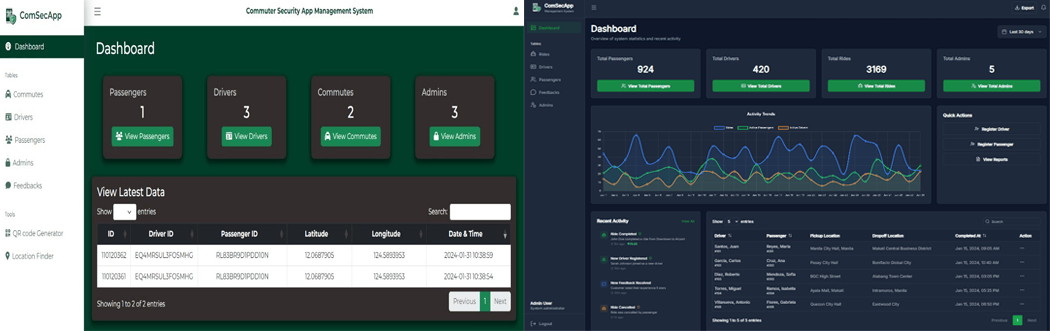
I built the admin panel with PHP, vanilla JavaScript, Bootstrap, and MySQL. It worked. It got me my degree. But it was 2023 code.
Fast forward to 2026. I've spent 2 years building enterprise systems at Summit Media with Vue 3, Nuxt 3, TypeScript, and modern patterns. Looking back at my capstone code?
I could do so much better.
So I rebuilt the admin dashboard—not because I had to, but because I wanted to see exactly how much I'd grown.
THE CHALLENGE
Constraint: Recreate the EXACT same features and UI
Goal: Use modern patterns I learned professionally
Tech Stack: Nuxt 4, Vue 3, TypeScript, Pinia, Tailwind CSS (Frontend) + Express.js, JWT, MySQL (Backend)
Features to Recreate:
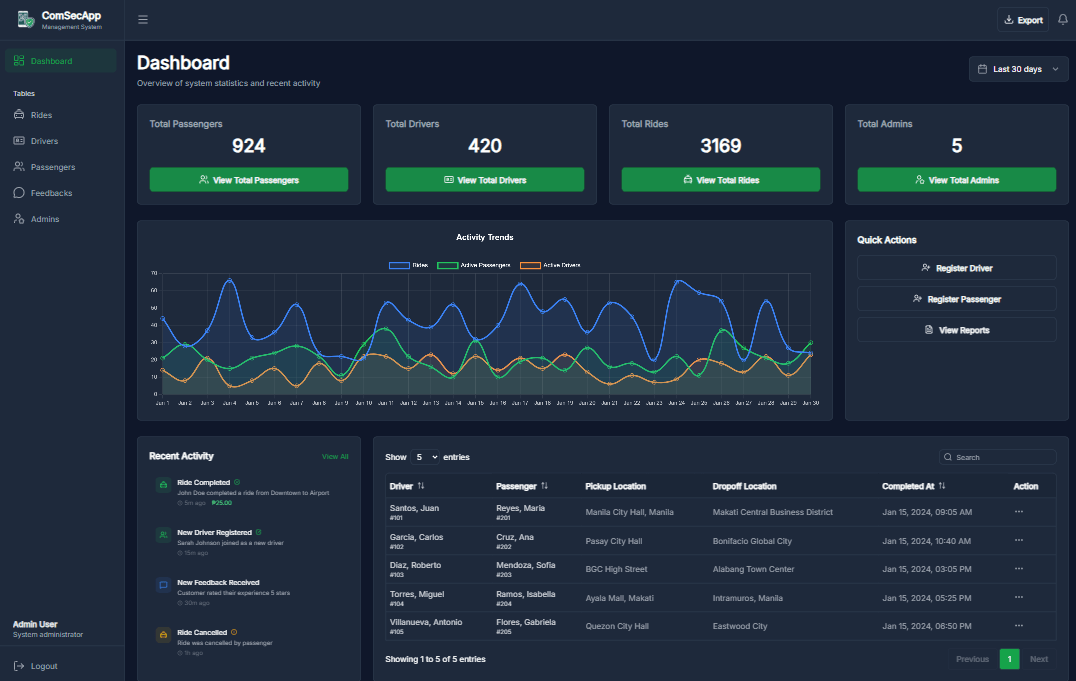
Dashboard Analytics
- Real-time statistics for passengers, drivers, rides, and admins
- Interactive charts and metrics
- Live updates without page refresh
User Management
- Manage passenger accounts
- Manage driver accounts
- Manage admin accounts
- Role-based access control
Ride Tracking
- View all rides in real-time
- Monitor ride status (pending, active, completed)
- Detailed ride information and history
Authentication
- Secure login system
- Protected routes with middleware
- Session management
Responsive Design
- Mobile-friendly interface
- Works on all screen sizes
- Touch-optimized interactions
WHAT I BUILT
The Old Way (2023 Capstone)
Tech Stack:
- PHP (backend + frontend logic)
- Vanilla JavaScript (DOM manipulation)
- Bootstrap (styling)
- MySQL (database)

Architecture:
- Monolithic PHP files
- Mixed concerns (HTML + PHP + SQL)
- Manual DOM updates
- No type safety
- ~2500 lines of mixed code
The New Way (2026 Rebuild)
Frontend:
- Nuxt 4 (framework)
- Vue 3 (reactive UI)
- TypeScript (type safety)
- Pinia (state management)
- Tailwind CSS (utility-first styling)
- Lucide Icons (modern iconography)
- ~1400 lines of organized, typed code

Backend (Separate Repository):
- Express.js (Node.js framework)
- JWT authentication with bcryptjs
- MySQL database
- RESTful API endpoints
- CORS support
- Comprehensive error handling

Architecture:
- Decoupled frontend and backend
- Component-based design (frontend)
- MVC pattern (backend)
- Reactive state management
- Full type safety
THE TECHNICAL DEEP DIVE
1. Component Architecture vs Procedural Code
Old approach (PHP):
<?php
// users.php - Everything in one file
if ($_GET['action'] == 'list') {
    $users = mysqli_query($conn, "SELECT * FROM users");
    while ($row = mysqli_fetch_assoc($users)) {
        echo "<tr><td>" . $row['name'] . "</td></tr>";
    }
}
?>
New approach (Vue/Nuxt):
// components/DataTable.vue - Reusable component
<template>
  <Table>
    <TableRow v-for="user in users" :key="user.id">
      <TableCell>{{ user.name }}</TableCell>
    </TableRow>
  </Table>
</template>

<script setup lang="ts">
const { users } = await useUsers(); // Type-safe composable
</script>
Why this is better:
- Reusable across the app
- Type-safe (TypeScript catches errors)
- Reactive (updates automatically when data changes)
- Testable (can test components in isolation)
2. State Management: Global Variables → Pinia
Old approach:
// Global variables scattered everywhere
var currentUser = null;
var rideData = [];

function loadRides() {
  $.ajax({
    url: "api/rides.php",
    success: function (data) {
      rideData = data;
      updateUI();
    },
  });
}
New approach:
// stores/rides.ts - Centralized, typed state
export const useRidesStore = defineStore("rides", () => {
  const rides = ref<Ride[]>([]);
  const loading = ref(false);

  async function fetchRides() {
    loading.value = true;
    rides.value = await $fetch("/api/rides");
    loading.value = false;
  }

  return { rides, loading, fetchRides };
});
Why this is better:
- Single source of truth
- Type-safe (Ride enforces structure)
- Reactive (components auto-update)
- Predictable state flow
3. Type Safety: Runtime Errors → Compile-Time Errors
Old approach (vanilla JS):
function displayRide(ride) {
  // What properties does ride have? Who knows!
  document.getElementById("status").innerHTML = ride.staus; // Typo!
  // This error only shows up when you run the code
}
New approach (TypeScript):
interface Ride {
  id: string;
  status: "pending" | "active" | "completed";
  passenger: User;
  driver: User;
}

function displayRide(ride: Ride) {
  console.log(ride.staus); // ❌ TypeScript error: Property 'staus' does not exist
  console.log(ride.status); // ✅ Correct
}
Why this is better:
- Catches typos before running code
- Self-documenting (you know what properties exist)
- Better IDE autocomplete
- Refactoring is safer
4. Styling: Custom CSS → Tailwind Utility Classes
Old approach (Bootstrap + custom CSS):
<div class="card user-card">
  <div class="card-header bg-primary">
    <h3 class="card-title">Users</h3>
  </div>
  <div class="card-body">
    <!-- content -->
  </div>
</div>

<style>
  .user-card {
    margin: 20px;
    box-shadow: 0 2px 4px rgba(0, 0, 0, 0.1);
  }
  .card-title {
    font-weight: 600;
    color: white;
  }
</style>
New approach (Tailwind CSS):
<div class="m-5 rounded-lg shadow-sm bg-white">
  <div class="bg-blue-600 p-4 rounded-t-lg">
    <h3 class="font-semibold text-white">Users</h3>
  </div>
  <div class="p-4">
    <!-- content -->
  </div>
</div>
Why this is better:
- No custom CSS files to maintain
- Consistent spacing/colors (design system)
- Faster to write (utility classes)
- Smaller bundle size (unused classes purged)
WHAT I LEARNED
1. The Power of TypeScript
I didn't use TypeScript in my capstone. Now I can't imagine building without it.
Real example from this rebuild:
I was building the user management table. In vanilla JS, I kept making mistakes:
- Accessing
user.fullNamewhen it was actuallyuser.full_name - Trying to display
ride.driverwhen it was sometimesnull - Not knowing what properties existed without checking the API response
TypeScript caught all of these before I even ran the code. That's powerful.
2. Component-Based Thinking
In my original capstone, every page was a separate PHP file with duplicated code:
users.phphad a tabledrivers.phphad the same table with different datarides.phphad the same table again
In Vue, I built one <DataTable> component and reused it everywhere with
different data. Change one component, update all pages. That's the power of
components.
3. State Management at Scale
In vanilla JS, I had data scattered everywhere:
var currentUser = null;
var allRides = [];
var filteredRides = [];
var selectedRide = null;
With Pinia, everything is organized:
useAuthStore(); // currentUser
useRidesStore(); // allRides, filteredRides, selectedRide
One source of truth. Predictable updates. Way easier to debug.
4. Modern CSS is Fast
Tailwind CSS let me recreate the exact same UI in about 1/3 the time.
Instead of:
- Write HTML
- Add class names
- Switch to CSS file
- Write styles
- Go back to HTML
- Adjust class names
I just:
- Write HTML with utility classes
- Done
The final bundle is actually smaller because Tailwind purges unused classes.
5. The Value of Rebuilding
This wasn't just a "portfolio project." It was a learning checkpoint.
By rebuilding something I knew intimately, I could focus on:
- How to solve problems, not what to build
- Why modern patterns are better, not just that they exist
- Where I've grown as a developer
The original took me 2 months in 2023.
This rebuild took me 2 weeks in 2026.
That's growth.
THE RESULTS
Before (2023 - PHP/Vanilla JS)
- ~2500 lines of mixed HTML/PHP/JavaScript
- No type safety
- Manual DOM manipulation
- Duplicated code across pages
- Hard to maintain and extend
After (2026 - Nuxt 4/TypeScript)
- ~1400 lines of organized, typed code
- Full TypeScript type safety
- Component-based architecture
- Reactive state management
- Pinia for predictable data flow
- Tailwind for consistent styling
- Easy to maintain and extend
What This Proves
Not just that I can learn new tech, but that I understand why modern patterns exist.
I didn't just follow a tutorial. I rebuilt something I knew deeply and saw the improvements firsthand:
- Faster development
- Fewer bugs
- Easier maintenance
- Better developer experience
TECH STACK
Frontend Framework: Nuxt 4
UI Framework: Vue 3 (Composition API)
Language: TypeScript
State Management: Pinia
Styling: Tailwind CSS
Icons: Lucide Vue Next
API Client: Custom composables with error handling
TRY IT YOURSELF
WHAT I'D DO DIFFERENTLY NEXT TIME
If I rebuilt this again today:
Add Real-Time Updates Use WebSockets instead of polling for truly real-time ride tracking
Implement E2E Testing Add Playwright tests to ensure features don't break
Add Data Visualization More interactive charts using D3.js or Chart.js
Optimize Bundle Size Implement lazy loading for routes and components
Add Offline Support Service workers for offline dashboard access
But honestly? For a personal learning project, I'm proud of where it is.
THE BIGGER PICTURE
This project represents 3 years of growth:
2023: Built my capstone with the tools I knew
2024: Learned modern frameworks professionally
2026: Rebuilt my capstone with everything I've learned
The cycle continues. What will I know in 2029 that makes this rebuild look outdated?
That's the exciting part—there's always more to learn.
Want to discuss modern refactoring or TypeScript patterns? Let's connect →