Splitlog — Personal Run Management Platform
I was tired of copy-pasting my Strava stats into Notion after every run. So I built my own platform to automate it. First full-stack project. First time with Next.js, Supabase, and real API integrations. The moment my run synced automatically? That's when it clicked.
THE BACKSTORY
Every time I finished a run, I had a ritual:
- Open Strava on my phone
- Read off the distance, time, pace, heart rate
- Open Notion
- Find my training plan database
- Manually type every stat into the right row
Every. Single. Run.
It was tedious. It was error-prone. And honestly, after a hard workout — the last thing I wanted to do was data entry.
So I did what any developer would do.
I built something to fix it.
THE CHALLENGE
This wasn't just a personal productivity problem. It was also my biggest technical challenge to date:
- 🆕 First time with Next.js — I had 2 years of Vue/Nuxt professionally, but React and Next.js were new territory
- 🆕 First time with Supabase — never built auth or a database layer from scratch before
- 🆕 First time with real API OAuth — Strava's OAuth 2.0 flow, webhooks, token refresh
- 🆕 First full-stack project — frontend, backend API routes, database, deployment. All me.
- 🤖 First time thinking about AI integration — planning an AI coaching feature mid-build
Almost every technology in this project was new to me.
I used AI tools (Claude) heavily to accelerate learning — but like my previous projects, I made sure to understand every line. I'd ask "why does this pattern work?" before moving on.
THE AHA MOMENT
I want to be honest about this.
There were a lot of "first times" in this project. First time setting up Supabase RLS policies. First time handling OAuth token refresh. First time building a webhook endpoint.
But the moment that made everything worth it?
I finished a run. Opened my app. And it was already there.
Distance, pace, heart rate, elevation — all synced automatically the moment Strava recorded my activity. No copy-pasting. No manual entry. Just my data, in my own platform, that I built from scratch.
That's when I understood what it meant to build something that actually solves a real problem.
THE PRODUCT
WHAT I BUILT
Core Features
1. Strava Auto-Sync via Webhooks
The heart of the whole app. When you finish a run, Strava sends a webhook event to my server within seconds. My app catches it, fetches the full activity details, and saves everything to the database automatically.
No manual sync. No polling. Just instant, real data.
2. Run Dashboard with TanStack Table
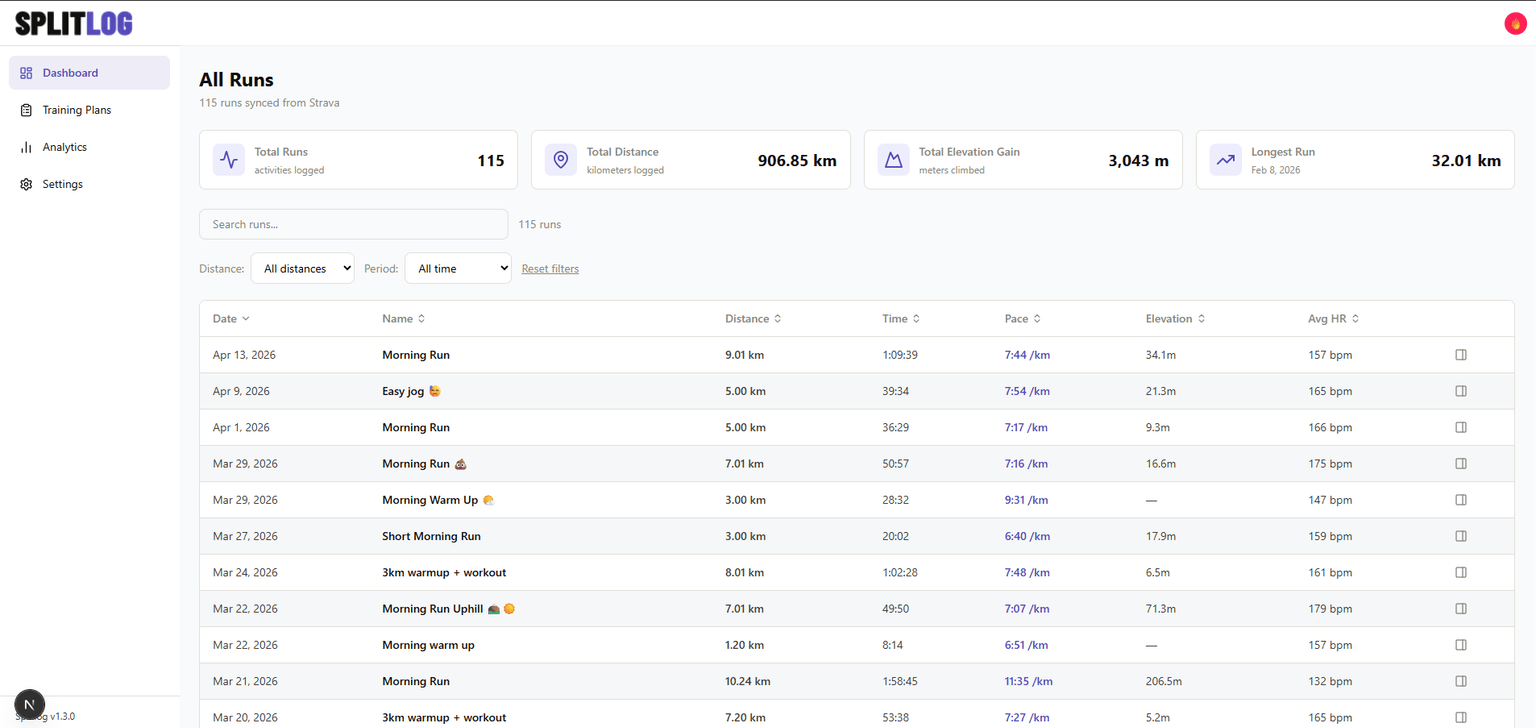
A powerful, filterable table of all your runs — something Strava's own UI makes surprisingly difficult.
- Sort by distance, pace, date, heart rate, elevation
- Filter by distance range (under 5km, 5–10km, half marathon, etc.)
- Filter by time period (last 30 days, 3 months, all time)
- Global search across all runs
- Pagination with configurable page size
- Stats cards showing total runs, total distance, longest run, total elevation
3. Training Plan Manager
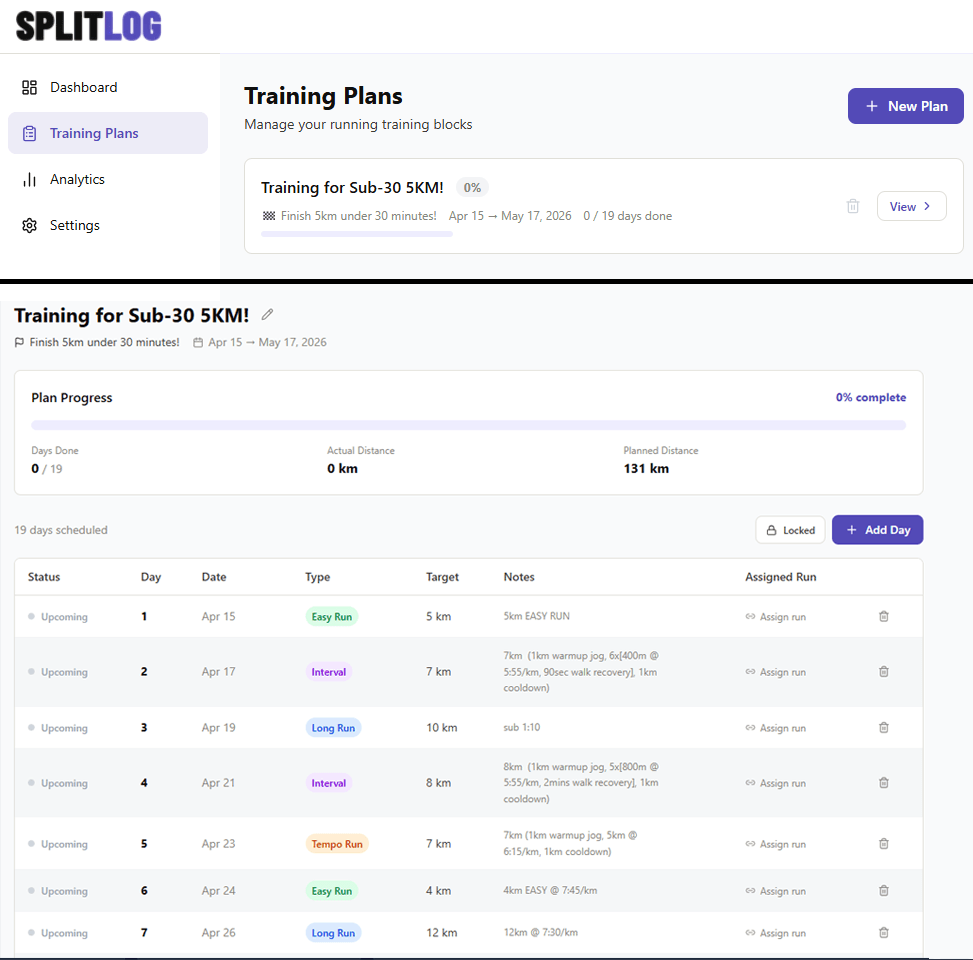
Create training plans (like "Training for 1st Marathon") with scheduled workout days. Each day has:
- Workout type (Easy Run, Tempo, Long Run, Interval, Rest)
- Target distance
- Scheduled date
- Notes
- Assigned Strava run with auto-filled stats
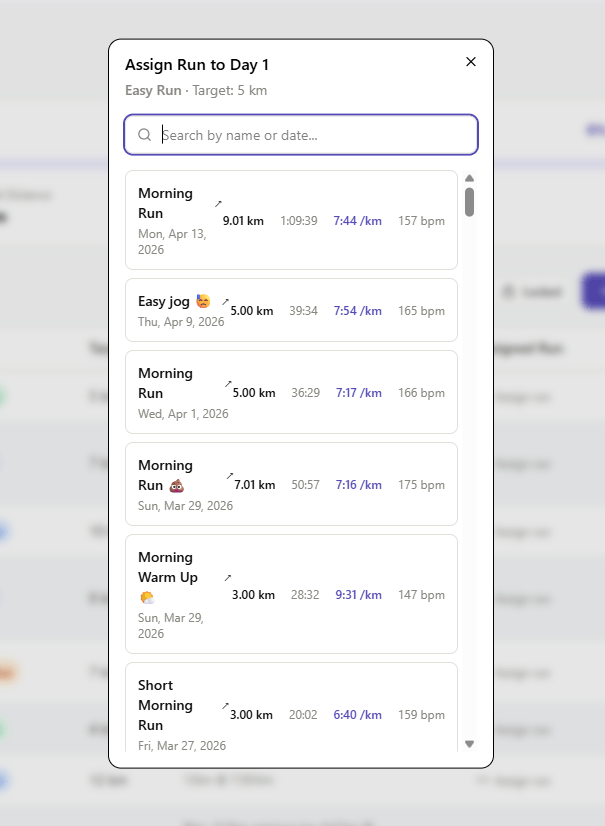
The assign flow is the feature I'm most proud of: click "Assign run" on any training day → modal shows all your Strava runs with stats → click one → distance, time, pace, HR all auto-fill instantly.
That replaced my entire Notion workflow.
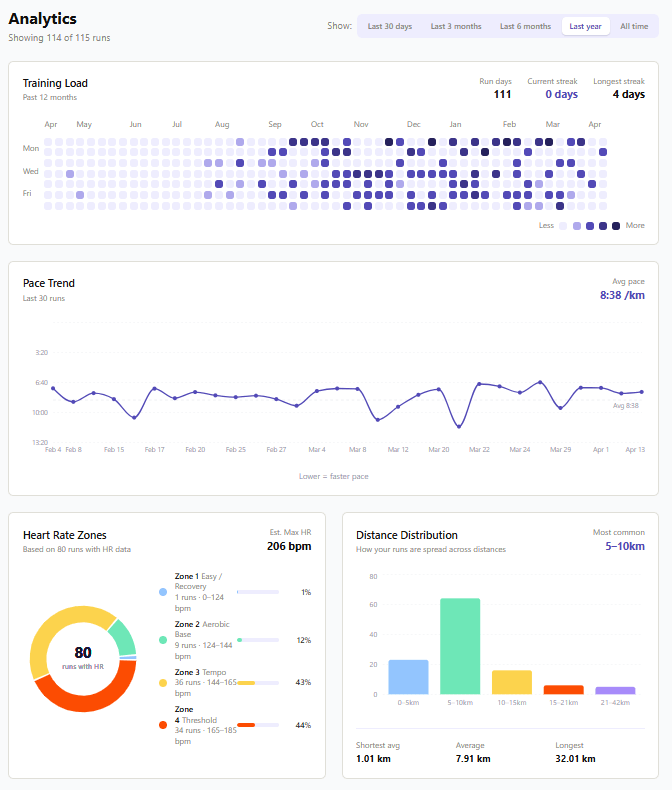
4. Analytics Page
Four charts built with Recharts:
- Training Heatmap — GitHub-style calendar showing which days you ran over the past year. Darker = longer run. Current streak tracked.
- Pace Trend — line chart showing if you're getting faster over time (inverted Y-axis because lower pace = faster)
- Heart Rate Zones — donut chart showing time spent in each of 5 HR zones
- Distance Distribution — bar chart grouping runs by distance range
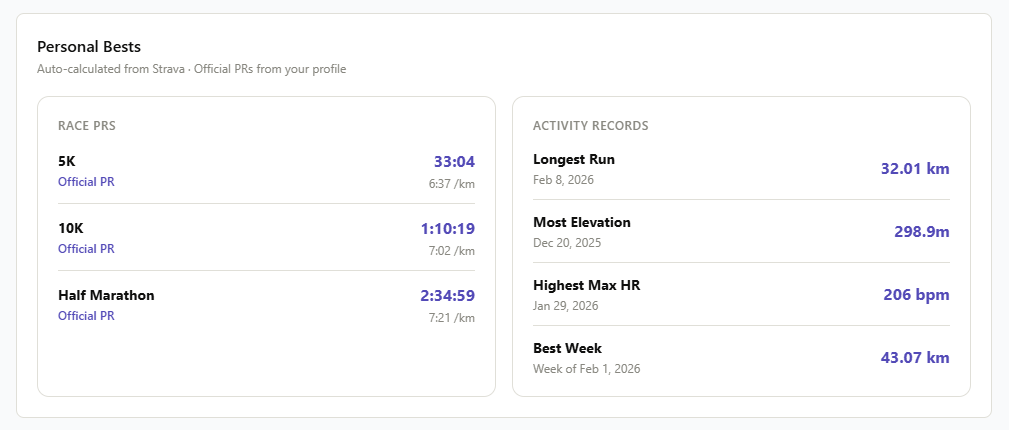
5. Personal Bests
Two dark cards showing your records:
- Race PRs (5K, 10K, Half Marathon, Marathon) — auto-calculated from your actual Strava data OR manually entered from official race results
- Activity Records (Longest Run, Most Elevation, Highest Max HR, Best Week)
Manual official PRs override auto-calculated ones and show an "Official" badge.
6. User Profile
Settings page with tabbed navigation:
- Profile — personal info, running profile, official race PRs, avatar picker
- Integrations — Strava connect + sync
- Preferences — coming soon
- Data — coming soon
Avatar picker has 18 preset avatars across 3 categories (Runners, Animals, Vibes). No file uploads — clean and simple.
THE TECHNICAL DEEP DIVE
1. Strava OAuth 2.0 + Webhook Pipeline
This was the most technically complex part of the whole project.
The OAuth flow:
You finish a run on Strava
→ Strava POST /api/webhooks/strava (within seconds)
→ validate webhook signature
→ fetch full activity from Strava API
→ filter: only save runs (not rides, swims, etc.)
→ transform Strava data → our DB schema
→ upsert to Supabase activities table
→ appears in dashboard automatically
The hardest bug I fixed: the webhook handler was querying Supabase using the regular client — but webhooks run without an authenticated user session. RLS was blocking the query silently.
Fix: Created a separate service role client that bypasses RLS for server-side operations:
// lib/supabase/service.ts
export function createServiceClient() {
  return createClient(
    process.env.NEXT_PUBLIC_SUPABASE_URL!,
    process.env.SUPABASE_SERVICE_ROLE_KEY!, // bypasses RLS
  );
}
That one change made everything work.
2. TanStack Table — Headless Table with Custom Filters
I chose TanStack Table v8 because I needed full control over sorting, filtering, grouping, and pagination without fighting a pre-styled component library.
The learning curve was steep. But the power is real.
Custom filter functions for non-standard comparisons:
// Distance range filter — checks if value is within [min, max]
const rangeFilter: FilterFn<Run> = (row, columnId, filterValue) => {
  const val = row.getValue(columnId) as number;
  const [min, max] = filterValue as [number, number];
  return val >= min && val <= max;
};

// Date filter — checks if run is after a cutoff date
const dateAfterFilter: FilterFn<Run> = (row, columnId, filterValue) => {
  const val = row.getValue(columnId) as string;
  if (!val) return false;
  return new Date(val) >= new Date(filterValue);
};
These let me build the distance range and time period dropdowns that filter the table instantly.
The stats cards react to filters too:
When you filter to "Last 30 days" — the stats cards (Total Runs, Total Distance, etc.) update to reflect only those filtered runs, not all runs.
I achieved this by passing filtered rows back up to the parent via a callback:
useEffect(() => {
  if (onFilteredRowsChange) {
    const filteredRows = table
      .getFilteredRowModel()
      .rows.map((row) => row.original);
    onFilteredRowsChange(filteredRows);
  }
}, [columnFilters, globalFilter, data]);
3. Database Design with Row Level Security
Five tables, all with Supabase RLS enabled:
users → extends Supabase auth
training_plans → user's training blocks
training_plan_days → scheduled workout days
activities → synced from Strava
plan_activity_map → links runs to plan days
user_profiles → personal info + PRs + avatar
RLS policies mean every query is automatically scoped to the logged-in user at the database level — not just in application code.
This makes the app SaaS-ready even though it's currently personal use only.
4. Personal Bests — Two Layer System
Layer 1 (automatic): Calculates PRs from existing Strava data using distance range matching:
function findBestEffort(runs, minKm, maxKm) {
  return runs
    .filter(
      (r) =>
        r.distance_km >= minKm &&
        r.distance_km <= maxKm &&
        r.avg_pace_sec_per_km > 0,
    )
    .sort((a, b) => a.avg_pace_sec_per_km - b.avg_pace_sec_per_km)[0];
}

const best5k = findBestEffort(runs, 4.8, 5.5);
const best10k = findBestEffort(runs, 9.5, 11.0);
Layer 2 (manual override): Official race PRs entered in the profile page. These override auto-calculated ones and show an "Official" badge.
Stored as seconds in the DB, displayed as mm:ss
or h:mm:ss — converted with a utility function:
export function secondsToTimeString(seconds) {
  const h = Math.floor(seconds / 3600);
  const m = Math.floor((seconds % 3600) / 60);
  const s = seconds % 60;
  if (h > 0)
    return `${h}:${m.toString().padStart(2, "0")}:
                     ${s.toString().padStart(2, "0")}`;
  return `${m}:${s.toString().padStart(2, "0")}`;
}
WHAT I LEARNED
1. New Tech Doesn't Have to Be Scary
I came from Vue/Nuxt. React and Next.js felt foreign at first.
But the mental models transferred:
- Vue
ref→ ReactuseState - Nuxt
useFetch→ TanStack QueryuseQuery - Vue
composables→ React custom hooks - Nuxt server routes → Next.js API routes
The concepts were the same. Just different syntax.
By week 2 of building Splitlog, Next.js felt natural. By week 4, I preferred the App Router pattern over anything I'd used before.
2. Debugging Real Integrations is Different
You can't mock a Strava webhook in your head. At some point you have to run it and see what breaks.
I learned to:
- Log everything during development
- Read error codes carefully
(
PGRST116= row not found in Supabase) - Check the obvious things first (is RLS blocking this? is the token expired?)
- Trust the data, not my assumptions
The webhook RLS bug took me an hour to debug. But I'll never forget how Supabase RLS works now.
3. AI-Assisted Development is a Skill
I used Claude heavily throughout this project — especially for patterns I'd never seen before (OAuth flows, webhook handlers, TanStack Table config).
But I learned that AI assistance is most powerful when:
- You understand the problem first
- You question the generated code
- You break down "why" it works before moving on
Copy-pasting without understanding is technical debt. Understanding first, then using AI to accelerate — that's the skill.
4. Full Stack Changes How You Think
Before Splitlog, I was a frontend developer who consumed APIs built by someone else.
Now I think in systems:
- How does the data flow from Strava → DB → UI?
- What happens when the token expires mid-request?
- How does RLS affect this query?
- What if two webhook events arrive simultaneously?
Full stack thinking made me a better frontend developer too.
THE RESULTS
What I Replaced
Before Splitlog — my post-run workflow:
Finish run → open Strava → copy stats →
open Notion → find training plan →
manually type every field → done
~5 minutes every run, error-prone
After Splitlog:
Finish run → open Splitlog →
data is already there ✓
~0 minutes, automatic
Technical Achievements
- ✅ Real-time Strava webhook sync (data appears within seconds of finishing a run)
- ✅ OAuth 2.0 with automatic token refresh
- ✅ Powerful run dashboard replacing Strava's limited activity list
- ✅ Training plan manager replacing Notion workflow
- ✅ Analytics with 4 chart types + personal bests
- ✅ User profile with 2-layer PR system
- ✅ Mobile responsive
- ✅ Deployed to production on Vercel
For Me
This project leveled me up across the board:
- Learned Next.js App Router from zero to production in 6 weeks
- Built my first full auth system (Supabase + middleware + protected routes)
- Integrated a real third-party API with OAuth + webhooks
- Deployed a full-stack app to production
- Started planning AI features — next version will include an AI coach that generates training plans automatically based on your Strava data and race goals
TECH STACK
Frontend: Next.js 15 (App Router), TypeScript
Styling: Tailwind CSS, shadcn/ui
Table: TanStack Table v8
Charts: Recharts
Data Fetching: TanStack Query
Database: Supabase (PostgreSQL)
Auth: Supabase Auth + middleware
API: Next.js API Routes (serverless)
Integration: Strava API v3 (OAuth 2.0 + Webhooks)
Deployment: Vercel
WHAT'S NEXT
Splitlog v2 is already planned:
AI Coach (In Progress)
An AI coach that generates your full training plan automatically based on:
- Your target race and goal time
- Your current fitness from actual Strava data
- Your weekly availability and preferences
No more manually adding training days one by one. Just tell the AI "I want to run a sub-2:00 half marathon in 12 weeks" and it builds the whole plan.
This will use the Claude API with a custom system prompt giving the AI your real run history as context — making the plans genuinely personalized, not just generic templates.
Garmin Support
Extend the integration to support Garmin Connect
alongside Strava.
Export to PDF/CSV
Download your training data for offline use or sharing.
Mobile App (Future)
A dedicated iOS and Android app built with React Native — so you can check your dashboard, review your training plan, and assign runs directly from your phone right after you finish a workout.
No more opening a browser. Just open the app, see your run already synced, tap to assign it to your training plan, and close it. The full Splitlog experience in your pocket.
THE BIGGER PICTURE
I started this project because I was frustrated with manual data entry after runs.
I ended up building a full-stack platform with:
- Real OAuth integrations
- Webhook-driven automation
- A database with proper security policies
- Charts and analytics
- A training plan system
- AI features on the roadmap
This is the project that made me a full-stack developer.
Not because it's the most complex app ever built. But because I built every layer of it myself — and I understood every decision I made along the way.
The next run is already tracked. 🏃
Oldweb Diary
A digital museum of early internet culture. Built a full-stack nostalgia platform with three retro OS themes, 50+ meme origin stories, This Day in Internet History, a Lost Media Vault, and a community Memory Wall.
Three Years Later: Rebuilding My College Capstone
From PHP/vanilla JS to Nuxt 4/TypeScript—what I learned by recreating my own work